
June 30, 2026
Managing your own website content should feel simple, not like wading through a form that never ends. That gets harder the more a site can do, when a single blog post or listing carries a dozen or more fields to fill in.
Webflow has just made that part a good deal tidier.
In short: you can now sort your content fields into neat, labelled sections, so editing your own site means opening the bit you need rather than scrolling past everything else.
Webflow has added CMS field grouping.
Instead of one long scroll of fields on a collection, you can now organise them into named sections, say a “basics” group up top and the more advanced settings below. Those same groups then show up for anyone editing the content, so the editing screen is tidy rather than a wall of inputs. You can even add a short description to each group to explain what it's for.
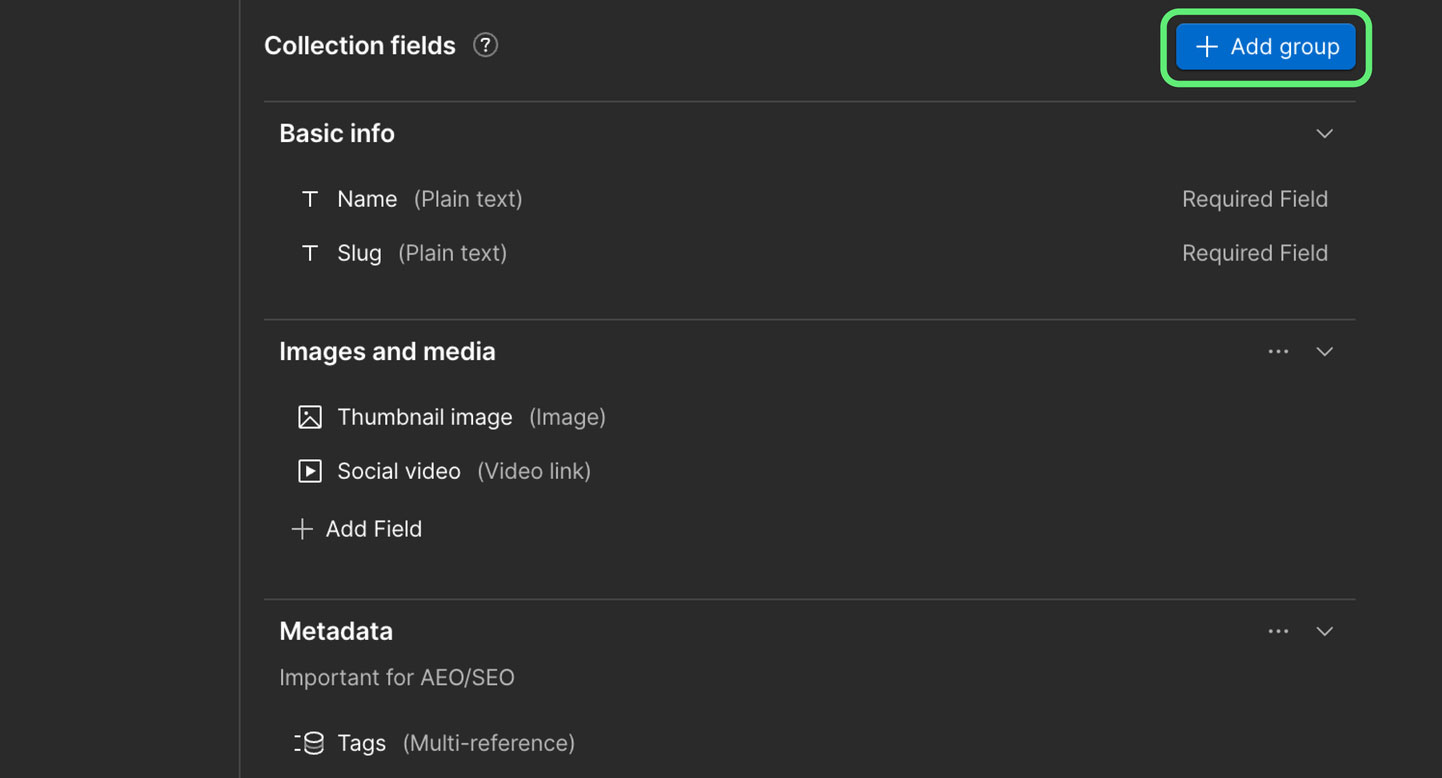
If you update your own site, this is a small but genuine quality-of-life improvement, especially on collections with a lot of fields.
“It just helps organise things better, particularly for clients that have quite elaborate collections,” says Dominic, owner of Hobart web design and digital marketing agency Wakeford Digital.
“Being able to group by basics and advanced, even as a top-level thing, helps them understand what's easy to add or tweak first, and what to deep-dive into later.”
You can see what's quick to change first, then get into the SEO and finer settings only when you want to. No more scrolling for ages to find the one field you came in for.
For anyone keeping regular content up to date, a guide updating a catch log, or a builder adding recent projects, that structure makes managing your own site a fair bit less intimidating. It also quietly reduces mistakes, because the fields that matter for a given job sit together instead of scattered about.
Editing your own content just got easier, plain and simple.
It's also the kind of behind-the-scenes tidy-up that adds up over time. “Even internally, we have discussions around SEO fields versus top-level fields,” says Dom. “Being able to open up just the area you need, rather than scrolling for days, is super handy.”
On the collections we build and manage, it means we can lay fields out so the everyday edits are obvious and the technical bits stay out of the way. We've already put it to work on our own News collection here.
September 24, 2026
Another month, another Google spam update, the fourth of 2026. Here's what the cadence means for Tasmanian businesses, and why thin content is still in the firing line.
read postLocal SEO
September 10, 2026
Google now lets verified Business Profile owners approve or reject suggested edits before they go live, a meaningful change for local SEO accuracy in Hobart and Tasmania.
read postAugust 18, 2026
Google's August 2026 spam update targets thin, spammy content. Here's what it means for Tasmanian businesses using AI to mass-produce articles, and how to stay on the right side of it.
read post